 text-to-cad


AI CAD app for mechanical engineers.
Describe a part and the AI builds a real CAD model. Change it by hand, test it, and send it to be made.
Free and open source. Uses your own Claude or ChatGPT account. What you need
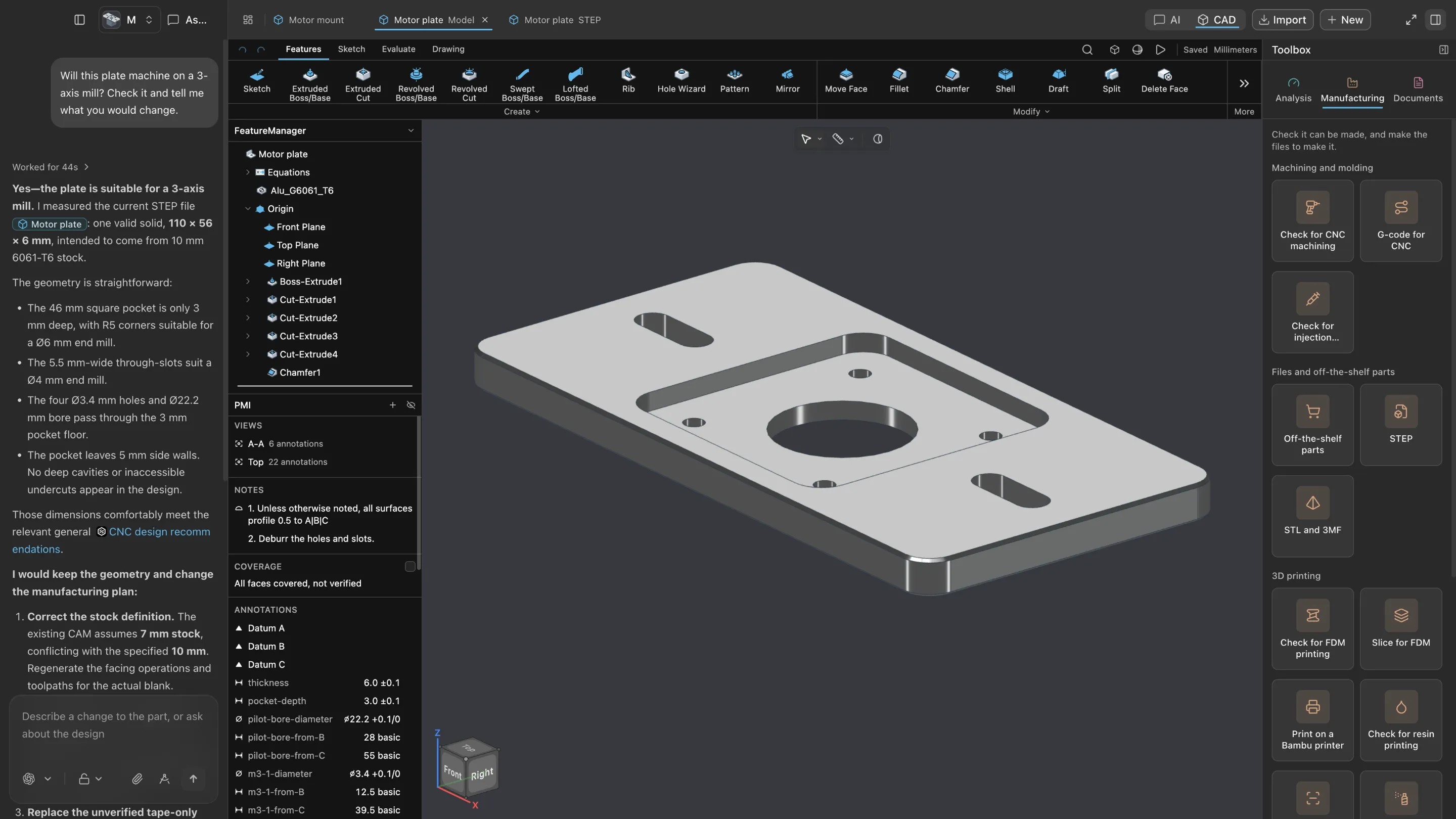
- 1ChatAsk for a part or a change. Attach a sketch, a spec or old CAD.
- 2Feature treeEvery step that built the part. Click one to change it.
- 3ToolbarThe CAD tools you know: sketch, extrude, fillet, hole.
- 4ModelThe real 3D part. Turn it, measure it, cut through it.
- 5ToolboxOne click to test it, check it can be made, or draw it.
Most AI apps are built for code. Studio is built for parts.
The same AI, on your own Claude or ChatGPT account. But instead of code, it works on parts: features, sizes, tests and drawings. Ask it, or change it yourself.
From a brief to a modelA of 12
Recorded in Studio. Long waits are sped up.
One click for each job
Pick a job in the Toolbox and the AI does it, asking for anything it needs, like the load or the machine.
Design
Parts and assemblies, each with its feature history. Drop in off-the-shelf parts.
Test
Strength under load, fit between parts, and range of motion.
Make
Check it for CNC, 3D printing, molding or sheet metal. Get G-code or send it to print.
Document
Engineering drawings, tolerances on the model, and step-by-step build guides.
Circuit boards
Design KiCad boards, check them, and export the files a board maker needs.
Robots
Robot descriptions, URDF and SDF, ready for simulation.
Each job is an open skill from text-to-cad you can read on GitHub: cad, engineering-drawing, fea, pcb, print3d, robot-simulation and sendcutsend.
Download Studio
Free and open source. Studio's AI runs on your own account, so there's no extra AI bill.
Mac
Apple silicon, M1 or newer.
The first time you open it, macOS says it came from the internet and that Apple checked it. Click Open.
Download for MacWindows
Windows 10 or 11, with Git for Windows.
If Windows says it protected your PC, click More info, then Run anyway.
Download for WindowsAbout 5 GB free. The CAD tools and strength solver come with the app.
An AI account. A Claude or ChatGPT subscription, or an invite code.
- Does it replace SolidWorks or Fusion?
- You don't have to choose. Studio exports STEP, STL and 3MF, so your parts open in the CAD you already use. Import brings existing models in, though their feature history doesn't come along.
- Where do my files live?
- On your computer. Each project is an ordinary folder. Every change is saved as a version, so you can compare any two and go back.
- Someone sent me an invite code. Where does it go?
- On Studio's first screen, click Use an invite code and paste it. You won't need a subscription.
- What can't it do yet?
- Strength tests are simple linear checks, and a drawing needs your review before it goes to a shop.